How to make AI video ads in Google Ads, and when Google labels them
Google Ads now makes video ads from product photos inside Asset Studio with Gemini Omni, free. The exact menu path, formats and limits, what Gemini Omni costs through the API, when Google puts an AI label overlay on your ad and in which six regions, the clearest study on what labels do to clicks, and how to test AI video against your own with a Demand Gen experiment.
How do you make AI video ads in Google Ads, and when will Google label them?
By Andrej Ruckij · November 6, 2026
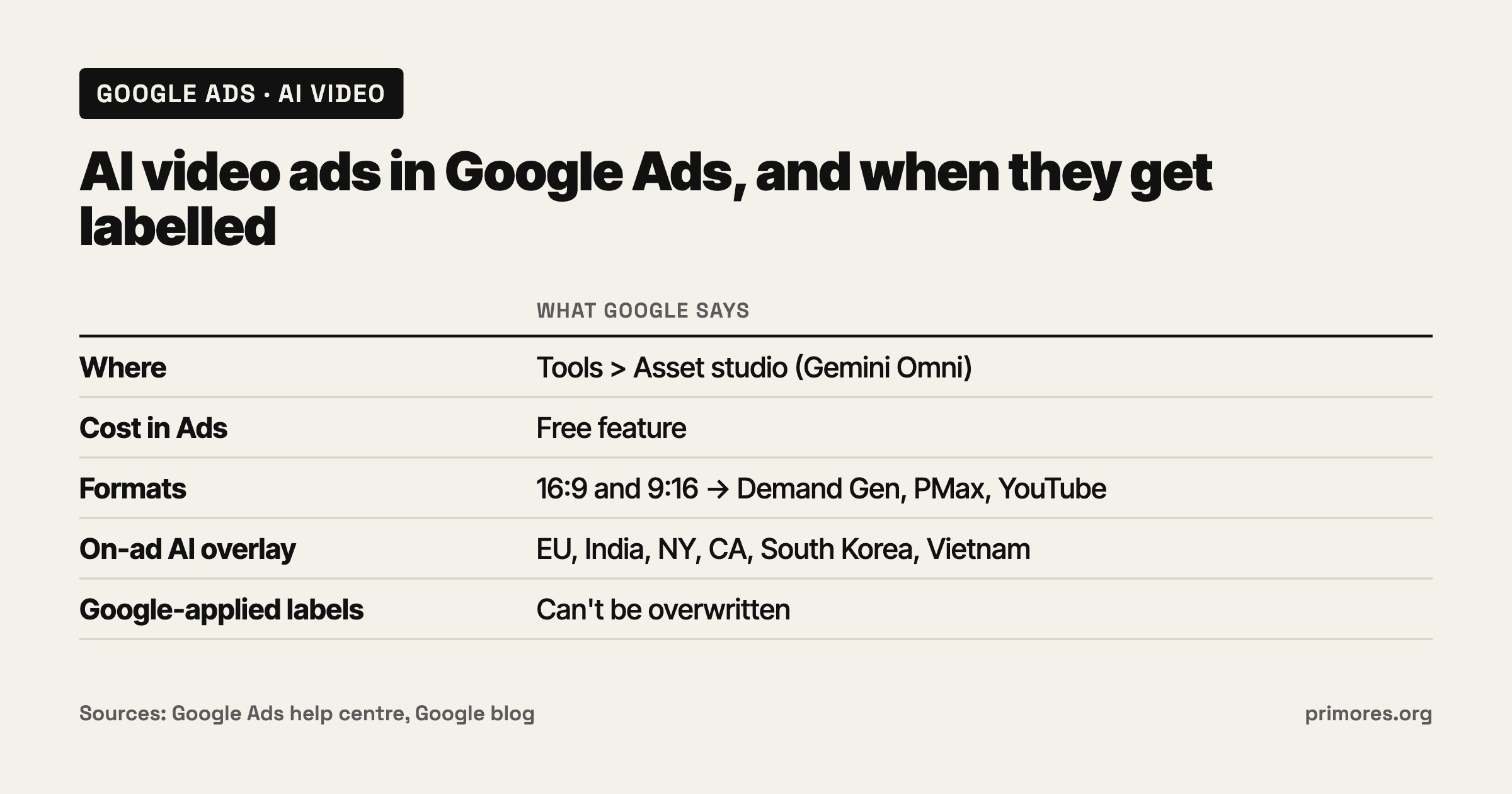
TL;DR: Open Tools > Asset studio in Google Ads. Google’s Gemini Omni workflow there takes your brand guidelines, a URL or existing images, builds storyboards and motion scenes, and exports 16:9 or 9:16 video to Demand Gen, Performance Max or other YouTube campaigns. Google calls it a free feature; you pay only for media. Gemini Omni 1.2 Flash through the Gemini API costs about $0.07 per second at 720p (around $1.04 for a 15-second clip); Google doesn’t say which Omni version Ads runs. If you mark an asset as AI-made, ads targeting the EU, India, New York, California, South Korea or Vietnam get a visible overlay; everywhere else the disclosure sits in “How this ad was made” in My Ad Center. Google can also label for you, and those labels can’t be overwritten. The clearest study I found on labels (NYU Stern and Emory) reports a 31.5% drop in click-through when AI use was disclosed, in experiments on visual ads; its summary page doesn’t mention video. Test with a Demand Gen experiment: your video against the AI video, Google’s auto-video and enhancements switched off in both arms, 50 conversions per arm, judged on cost per conversion.
If you have product photos but no footage, Primores turns catalog shots into product video and re-cuts it for every placement: AI video for brands.
This is for advertisers running Performance Max, Demand Gen or YouTube campaigns with product photos and little video. Whether AI ads work in general is in do AI-generated ads work?; avatar video is in how to make AI UGC ads. If your ad needs a person on screen, read that one first: both hands-on reviews quoted below got their worst output when a human figure was in the frame.
How to make a video ad in Asset Studio
Google added Gemini Omni to Asset Studio after announcing it at Google Marketing Live on May 20, 2026 (PPC Land, trade press). The steps below follow Google’s own announcement page (Google, official) and help centre (Google Ads Help, official).
- Open Asset Studio. In Google Ads, go to Tools > Asset studio. Check that you see Video builder in the feature list (“make horizontal or vertical video ads, no editing software required”). If you don’t, the rollout hasn’t reached your account yet.
- Anchor your brand. Import your brand guidelines and your website URL. A few minutes.
- Generate concepts. Write a short prompt, or select static images already in your library. Omni returns storyboards and motion scenes. Check every frame that shows your product, logo or on-screen text against the real thing.
- Refine with prompts. Ask for changes to scenes, voice-over, pacing and aspect ratio. Make one 16:9 and one 9:16 version. Trim video and Add voiceover sit in the same tool.
- Package and deploy. Export to a Demand Gen, Performance Max or other YouTube campaign.
- Check the AI label. After upload, open Asset library and look at the AI label status column. Google doesn’t say whether Asset Studio output is labelled automatically (Relevant Audience, agency write-up: “The article doesn’t specifically tie Asset Studio to automatic labelling”), so set it yourself and confirm it stuck.
- Save what you’ll reuse. Generation history is “automatically saved and retained for 55 days”. Download anything you want to keep longer.
For a plain slideshow in your fonts and colours, the older template route still works: Asset library > + Create new > Video > + Create video, choose a template, add assets, review the Storyboard, then Continue to upload to a YouTube channel (Google Ads Help, official).
Formats and limits
| Tool | Where | Formats | Length | What to know |
|---|---|---|---|---|
| Gemini Omni in Asset Studio | Tools > Asset studio | 16:9, 9:16 | Not stated by Google for Ads | Free; exports to Demand Gen, PMax, YouTube (Google) |
| Gemini Omni 1.2 Flash, the model | Launched Nov 5, 2026 | Set per clip | 3 to 15 seconds | Drafts at 360p or 720p, upscale to 1080p or 4K; SynthID watermark; Google doesn’t say whether Ads runs 1.2 yet (Google blog) |
| Veo variations from static images | Demand Gen | Not listed | Not listed | ”generate high-quality video variations from static images” (Google) |
| Template video | Asset library | Template-based | Template-based | Uploads to your YouTube channel (Google Ads Help) |
| Auto-generated video | PMax (asset group), Demand Gen (ad) | 16:9, 1:1, 9:16 | Demand Gen: 10-second clips from images | On unless you act; hosted on a Google channel you can’t manage (Google Ads Help) |
| Video enhancements | PMax, Demand Gen | Square and vertical from 16:9 | Shorter cuts picked by Gemini | AI voice-over added if your video has none, English only (Google Ads Help) |
Two defaults matter. In Performance Max, “The system automatically disables auto-generated video ads if you upload your own videos”. In Demand Gen, auto-generated video shows as “Advertiser” in reporting, like your own uploads, so you can’t easily tell what served (Google Ads Help). New Demand Gen campaigns also tick “Shorter videos” and “Resized videos” by default (Google Ads Help, official).
What it costs
Inside Google Ads, Google says Omni is “rolling out globally as a free feature” (Google, official). No generation quota is published.
Outside Ads, Gemini Omni 1.2 Flash is sold through the Gemini API; Google doesn’t say whether that is the version inside Ads. Prices checked on Google’s AI Studio pricing page on November 6, 2026 (Google AI Studio, official). There is no free tier for gemini-omni-1.2-flash; output video is $12.00 per 1M tokens, which Google converts to a per-second rate:
| Resolution | Price per second (Google) | 10-second clip | 15-second clip |
|---|---|---|---|
| 360p | $0.023 | $0.23 | $0.35 |
| 720p | ~$0.07 | ~$0.70 (Google) | ~$1.04 (Google) |
| 1080p (upsampled) | $0.104 | $1.04 | $1.56 |
| 4K (upsampled) | $0.209 | $2.09 | $3.14 |
Clip prices other than Google’s two 720p examples are my arithmetic. From December 3, 2026, requests to Omni 1.1 Flash (about $0.10 per second) route to 1.2 and bill at 1.2 rates. Twenty 15-second drafts at 360p cost about $7. Since Ads is free, the API pays off only when you need control Asset Studio doesn’t give, such as your own editing pipeline. I didn’t capture Veo’s API price.
When Google labels AI video ads
Quotes below are from Google’s help page (Google Ads Help, official) and policy update (Google Ads policy, official).
Two layers of disclosure. Everywhere, an ad you mark as AI-made gets a note in “How this ad was made” in My Ad Center, reached from the three-dot menu on ads “across Search, YouTube and Discover”. On top of that, “For campaigns that target the following locations, ads with assets that you designate as AI created or edited … will also include visible overlays on the ads.” The locations are the European Union, India, New York, California, South Korea and Vietnam. California, South Korea and Vietnam were added this week (Search Engine Roundtable, trade press).
Self-labelling. You set the label per asset in Asset library. Since July 2026 you can also put your own text or visual label inside the image or video, and it won’t break the text-overlay and watermark policies. Keep it away from the edges, because enhancements can crop the frame.
When Google labels for you. “Google may label your assets in some cases, such as in regions where Google itself is legally required to do so”, when it receives signals from other platforms, and “When you use Google’s fully-automated features to create and serve creatives”. “In any of these cases, labels cannot be overwritten.” Auto-generated video in PMax and Demand Gen is fully automated; manual Asset Studio work may not be (see step 6 above).
What the label doesn’t do. “Use of the AI label setting … doesn’t guarantee your compliance with specific regulations.” Assets made with Google’s tools also carry machine-readable SynthID and C2PA marks.
I found no Google page or press piece showing what the overlay says or looks like.
The laws behind the six regions
| Region | Law | Who carries the duty | Key date | Source type |
|---|---|---|---|---|
| EU | AI Act, Article 50 | Providers mark output as AI; deployers disclose deep fakes of realistic people, places or events | Applies 2 Aug 2026; marking on systems already on the market gets until 2 Dec 2026 under Regulation (EU) 2026/1744 | Act text (artificialintelligenceact.eu); delay per law-firm summaries (Cooley, iubenda) |
| New York | Synthetic performer law (General Business Law §396-b) | Whoever produces or creates the ad must “conspicuously disclose” an AI-made human; $1,000 first violation, $5,000 after | In force June 9, 2026 | Law-firm summary (Cooley) |
| California | AI Transparency Act (SB 942, amended by AB 853) | GenAI providers with over one million monthly users; not advertisers | Operative Aug 2, 2026 | Law-firm summary (Morgan Lewis) |
| South Korea | AI Basic Act | Generative AI operators must label output | In force Jan 22, 2026; one-year grace on fines indicated | Law-firm summary (Cooley) |
| India | IT Rules amendment 2026 | Platforms that enable synthetic media; “prominent visibility” for visual labels | In force Feb 20, 2026 | Law-firm summary (AZB & Partners) |
| Vietnam | Not researched | On Google’s list; I didn’t read the law |
Mostly the duty sits with the platform or tool provider, which is why Google adds the overlay. New York is the clear advertiser-side duty, and only for a synthetic human; products and backgrounds don’t count. In the EU, the deep-fake rule can reach realistic scenes. Whether an animated product shot counts is a legal call; this is not legal advice.
Does an AI label hurt results?
The clearest number I found comes from Anindya Ghose and co-authors at NYU Stern and Emory, who ran experiments on visual ads (NYU Stern, study). Fully AI-created ads raised click-through “by up to 19% compared to ads made by human experts”. Disclosing AI use caused “a 31.5% decrease in click-through rates” (PPC Land, trade press, reporting the same study).
The limits matter for anyone reading this as a video result:
- The Stern page describes visual ads and says nothing about video, so don’t read it as a video result.
- The Stern page doesn’t name the platform, the advertiser or the product category.
- The Stern page doesn’t say whether the 31.5% comes from the field test or the lab, so treat it as a direction.
- I found no data from Google on what its own overlay does to performance.
The IAB’s voluntary disclosure framework from August cites the study and argues for labels only where there is a “material risk” of misleading people (PPC Land). That is an industry body’s view.
If you target the six overlay regions, I’d measure the label cost on your own account instead of assuming 31.5% or zero.
How to test AI video against your own
Use a Demand Gen experiment (Google Ads Help, official). Google also announced “1-click creative testing” for Asset Studio output (PPC Land, trade press), without naming the campaign types it covers.
- Create the experiment. Go to Campaigns > Experiments > + and choose Demand Gen experiment. For one creative variable, use A/B test assets. Pick the control campaign, then Create treatment campaign, which copies it at the same daily budget. Use a 50% split. Custom Experiments allows up to 10 arms.
- Set the arms. Arm A: your human-made video. Arm B: the Asset Studio video, AI label set. Same audience, bid strategy, budget and start date.
- Switch off Google’s own AI video in both arms. Enhancements carry over from the control, so Google’s generated variants would serve in your “human” arm too. In Demand Gen, turn off auto-generated video at ad level and the video options under Creative optimizations, and uncheck “Videos” under Asset optimization (Google Ads Help). In PMax, the path is Asset optimization > Video, uncheck “Enhancement” (Google Ads Help).
- Pick one primary metric: Cost/conv. A label or a flashy clip can move clicks without moving sales.
- Get to 50 conversions per arm. With conversion bidding, each arm needs at least 50 conversions before results show. On thin volume, Google suggests Target CPA or Max conversions on a shallow event such as Add to Cart.
- Read the confidence level. 70% is the default and Google calls it “directional”; 80% is available; 95% is “conclusive”. I’d look at 80% and change budgets only at 95%.
- End the experiment. Budget changes don’t sync to the treatment, and arms left running can keep serving on restricted traffic.
To measure the label itself, run the same video in the same geo, labelled in one arm and not in the other. That works only outside the overlay regions, for example the US excluding California and New York, with a label inside the creative in one arm. A geo split would mix the label effect with the geo effect.
What goes wrong
The hands-on reviews below are small tests with no performance numbers, and none tested Omni 1.2.
- People. “Human figures frequently trigger errors, meaning anything resembling a face tends to fail” (Browser Media, hands-on review, April 2026, before Omni). 97th Floor found lifestyle humans “obviously synthetic once you looked closely”, including a figure “whose legs didn’t quite reach the floor” (97th Floor, hands-on review, September 2026). An AI person in a New York-targeted ad also triggers the disclosure law.
- Logos, text and colour. Browser Media found the tool “can even struggle with text and company logos”; 97th Floor saw logo and copy “flattened everything into one background”. ALM Corp advises caution on “custom typography, product photography, and exact color matching” (ALM Corp, agency write-up).
- Motion that is only a camera move. Before Omni, image-to-video “basically zooms in or pans around the image”, with “no scene-level prompting” and a fixed music library (Browser Media).
- Physics. Google itself says Omni 1.2 is still improving on “fast sports action, rapid script changes and complex physics” (Google blog).
- Generic auto-video. An early look at PMax auto-video called it “very generic” (Search Engine Roundtable, 2022).
- Defaults you didn’t choose. Auto-video, resizing, shorter cuts and AI voice-over stay on until you switch them off.
Both reviewers still found it useful. Browser Media called it “a genuinely useful, free tool”; 97th Floor rated it worthwhile for catalogue variations.
What nobody has published yet
- I found no independent measured comparison of Asset Studio, Omni or Veo video against human-made video in Google Ads. ALM Corp notes Google “has not commented publicly on the performance” of Omni video.
- Google hasn’t published the clip length, quota, languages or square support for Omni inside Ads, or which Omni version Ads runs.
- The overlay’s wording and look, and whether manual Asset Studio output is auto-labelled, are undocumented.
- I found no study of AI labels on video ads. The NYU page describes visual ads and doesn’t mention video.
- I couldn’t load the EU regulation on EUR-Lex, and I read the Korean and Indian rules only through law-firm summaries.
Related: do AI-generated ads work?, how to make AI UGC ads, and our wiki on glossary/content-provenance and marketing/ai-video-marketing.
Sources
- Google: Gemini Omni 1.2 Flash
- Google: Gemini Omni in Google Ads
- Google Ads Help: About Asset studio
- Google Ads Help: create a video from a template
- Google Ads Help: auto-generated video ads
- Google Ads Help: Demand Gen creative enhancements
- Google Ads Help: video enhancements
- Google Ads Help: AI content label settings and disclosures
- Google Ads policy: AI labels in creatives
- Google Ads Help: Demand Gen A/B experiments
- Google: Demand Gen Drop, March 2026
- Google AI Studio: pricing
- EU AI Act, Article 50
- Cooley: Digital AI Omnibus
- iubenda: AI Omnibus adopted
- Morgan Lewis: California AI disclosure rules
- Cooley: New York synthetic performer law
- Cooley: South Korea’s AI Basic Act
- AZB & Partners: India IT Rules amendment
- NYU Stern: the AI advertising paradox
- PPC Land: AI ad labels cut click-through 31.5%
- PPC Land: Asset Studio gets Gemini Omni
- Search Engine Roundtable: AI label expansion
- Search Engine Roundtable: PMax auto-generated videos
- Relevant Audience: AI label overlays
- ALM Corp: Gemini Omni video tools in Google Ads
- Browser Media: are Veo and Asset Studio any good?
- 97th Floor: Asset Studio test drive