Google Local Services Ads vs AI Mode booking for home-services businesses
Since November 4, 2026, Google AI Mode in the US can send booking and quote requests to home-services pros through Jobber, Housecall Pro, Angi and Thumbtack. Jobber and Housecall Pro say those requests carry no lead fee, while Local Services Ads charge per lead. What each costs, who can be listed today, how to set it up, and what nobody has measured yet.
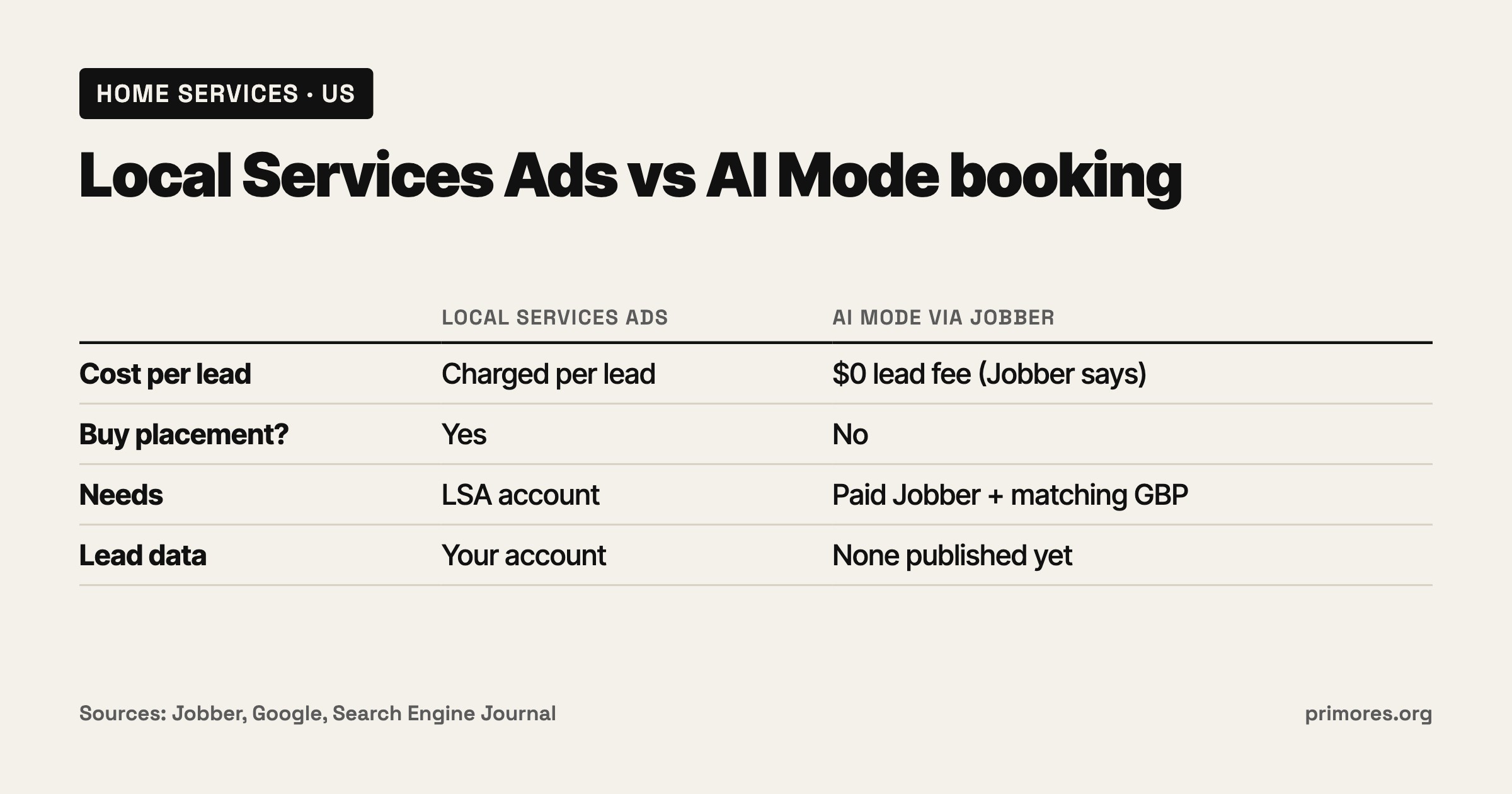
Should you still pay for Google Local Services Ads now that AI Mode can send booking requests without a lead fee?
By Andrej Ruckij · November 6, 2026
TL;DR: On November 4, 2026, Google added booking and quote links for home services to AI Mode, US only. The partners are Jobber, Housecall Pro, Angi and Thumbtack, with ServiceTitan “coming soon”. Jobber and Housecall Pro say requests from AI Mode carry no lead fee, as long as you pay for their software. Local Services Ads charge for every qualifying lead, booking requests included. Today you can be bookable through Jobber (paid, non-trial accounts, after a Google Business Profile match) and, depending on which of its pages you read, Housecall Pro. Angi sends people to a quote request on Angi, and whether Angi charges for it is unclear. What’s missing is evidence: no one has published lead volume, spam or no-show data from AI Mode yet. Keep LSA running and add AI Mode alongside it, then compare cost per booked job after 30 days.
Who this is for, and who it isn’t
This is for a US trades, cleaning or repair business, or its agency, that pays for Local Services Ads or is considering it. It matters most if you run jobs in Jobber or Housecall Pro.
It doesn’t apply to you if you’re outside the US: Google says the feature is “available within the United States only right now” (SERoundtable). It also doesn’t apply if you sell online rather than book visits. And if you use none of the partner platforms, Search Engine Journal points out that your business has no route to direct bookings through AI Mode (SEJ).
What launched: Google AI Mode booking for home services
Robby Stein, VP of Product for Search, announced it on X: “Today, we’re making it even easier to research & book home services with direct links in AI Mode”, adding “It’s available now in the U.S.” (SEJ). In Google’s demo, AI Mode lists local handymen “with online availability”, with ratings and appointment times.
What Google hasn’t said matters as much. SEJ notes that the announcement doesn’t describe how Google decides which businesses to show in AI Mode (SEJ).
How AI Mode booking works, partner by partner
| Partner | Status on Nov 6, 2026 | How you get listed | Lead fee | Source |
|---|---|---|---|---|
| Jobber | Live | Paid, non-trial Jobber account; turn on Help clients find my business; address, phone and website must match your Google Business Profile | ”There are no lead fees for requests that come through Google AI Mode” | Jobber help |
| Housecall Pro | Conflicting: one page says “coming soon”, another says “live from day one” | Auto-enrolled, per its partner page; its FAQ says no Google Business Profile is needed | ”no associated lead fees or bidding” | Housecall Pro news, partner page |
| Angi | Live | The homeowner goes to your Angi profile “to learn more and request a quote” | Not stated; SEJ notes Angi’s announcement doesn’t say whether pro fees apply | SEJ |
| Thumbtack | Named by Google, no published plan | Unknown | Unknown | SEJ |
| ServiceTitan | ”Coming soon” | Unknown | Unknown | SERoundtable |
Jobber is the best documented. The integration is “available at no extra cost to businesses in the United States with an active, paid Jobber subscription”, and “Trial accounts can’t appear in Google AI Mode” (Jobber help). Once Google matches your profile, it adds a Book Online button linking to your Jobber form, which “happens automatically and usually within a few days”. Requests show up under Requests or Jobs with a notification. Jobber’s press release says requests arrive “without lead fees or additional administrative work” and that you can approve them before they reach your schedule (Jobber press release).
Housecall Pro contradicts itself. Its news page says the integration “is coming soon to eligible US customers” and that “all Housecall Pro users will be eligible to appear in AI Mode at no additional cost” (Housecall Pro news). Its partner page says “Live from day one, no setup required” and “Every Pro is auto-enrolled”, with time slots pulled “from your calendar” (Housecall Pro partner page). Treat it as rolling out and check your Inbox, where requests land. The partner page lists no opt-out.
Angi sends people to a quote request rather than a booking. I couldn’t open Angi’s own release, so this comes from SEJ, which notes Angi’s annual report says pros pay fees for consumer matches. An AI Mode quote through Angi is probably still a paid Angi lead, unconfirmed.
ServiceTitan is listed as coming soon. Yet in Cheers’ tracking of AI Mode answers from August 31 to September 20, before the launch, ServiceTitan booking pages already appeared in 10.6% of answers (Cheers). Cheers, which sells AI-search tools to local businesses, infers these links come from Business Profile booking links. It didn’t verify that, and no Google document says Business Profile booking links feed AI Mode.
How Local Services Ads work, and what they cost
Google Local Services Ads charge per lead. Google’s “How leads work” page lists what counts: an answered call, a missed call during business hours where the customer stays on the line “more than 20 seconds”, a text, email or voicemail, and a booking request (“US and Canada only”) (Google LSA help). A follow-up from the same number or email within 15 days isn’t charged again.
Google Local Services Ads cost
Google doesn’t publish a fixed price. Lead prices “vary by location, job type, lead type, and bidding mode”, and message leads are usually cheaper than phone leads (Google LSA help). So the honest answer is that you’ll only know your cost per lead from your own account.
Google Guaranteed Local Services Ads
Google is retiring the Google Guaranteed badge; trade press calls the replacement Google Verified. Google says it “will be discontinuing the Money Back Guarantee associated with the Google Guarantee badge”, reimbursement covers services booked before December 7, 2025, and it is “launching a single badge for all advertisers” (Google LSA help). Older guides that sell LSA on the guarantee are out of date.
Local Services Ads vs Google Ads
My sources don’t cover regular Google Ads, so one point only: LSA bills per lead as defined above, and that is the number to set against AI Mode’s $0 lead fee.
Side by side
| Local Services Ads | AI Mode via Jobber | AI Mode via Housecall Pro | AI Mode via Angi | |
|---|---|---|---|---|
| Cost per lead | Charged per qualifying lead, price varies | $0 lead fee (Jobber says), paid subscription required | $0 lead fee (Housecall Pro says), subscription required | Unclear, probably an Angi lead fee |
| Can you buy placement? | Yes, it’s a paid slot | No, inclusion isn’t guaranteed | No | No |
| What the customer does | Calls, messages or sends a booking request | Books or requests through your Jobber form | Books a slot from your calendar | Requests a quote on Angi |
| Google Business Profile needed | Not covered in my sources | Yes, matched to your Jobber address | No, per its FAQ | Not stated |
| Published lead data | Your own account reports | None yet | None yet | None yet |
| Countries | US and Canada for booking leads | US only | US only | US only |
Sources: Google LSA help, Jobber help, Housecall Pro partner page, SEJ.
The trade-off is control against price. LSA is a slot you can pay for. AI Mode inclusion can’t be bought, and AI answers rotate a lot: BrightLocal measured only 20-33% overlap between repeat runs of the same prompts, and AI Mode names 3.5 businesses per answer on average (BrightLocal).
What AI Mode uses to pick providers
Google publishes no formula. Its documented line, quoted by Cheers, is that AI features are “rooted in our core Search ranking and quality systems” (Cheers). The measurements, all from vendors:
- Business Profile carries weight. BrightLocal, which sells local SEO software, measured 1.97M citations and found “Google Business Profile, in fact, made up 28.5% of all citations across all three platforms” (ChatGPT, AI Mode and AI Overviews). (BrightLocal).
- High ratings, but not only big review counts. In Cheers’ 9,435 AI Mode answers, the median rating shown was 4.9 stars. The median review count was 226, but 23.5% of answers named at least one business with fewer than 20 reviews (Cheers).
- Booking links were already common in some trades. Before launch, 31.2% of AI Mode answers linked a field-service booking page, from 39.4% in plumbing down to 1.8% in roofing (Cheers).
- Emergency jobs mention hours. 92.8% of emergency answers mentioned 24/7 or after-hours availability (Cheers).
- Experts point at mentions elsewhere. Whitespark’s survey of 47 experts, published in November 2025 before AI Mode booking existed, ranks presence on “best of” lists and a dedicated page per service as the top AI factors. That’s opinion, not measurement (Whitespark).
Jobber says reviews and a booking form help you get recommended; Google hasn’t confirmed that.
Which to pick
Keep LSA and add AI Mode if LSA is profitable for you today. AI Mode costs nothing extra per lead on Jobber, and turning off a working paid channel for one with no published data is a bet I wouldn’t make.
Add AI Mode first and hold LSA spend flat if you’re on a paid Jobber plan and LSA leads are marginal. Measure for 30 days before cutting anything.
Check your Housecall Pro Inbox before doing anything if you’re on Housecall Pro. Its partner page says you’re already enrolled with no setup, its other page says it’s coming soon.
Ask Angi in writing if you’re an Angi pro. Find out whether a quote request that started in AI Mode is billed like any other Angi lead before you count it as free.
Stay with LSA if you use none of the partner platforms. There’s no direct AI Mode booking route for you yet, and switching job software to chase an unmeasured channel is a big move.
Where I land: for people already paying for Jobber or Housecall Pro, AI Mode is an extra source of requests with no lead fee. It doesn’t yet justify cutting a paid channel that’s working, because nobody can tell you how many jobs it sends.
How to set it up this week
For Jobber users, from Jobber’s help page and Google Business Profile connection page:
- Confirm you’re on a paid plan. Trial accounts can’t appear.
- Turn on Help clients find my business in Company Settings.
- Enter your full business address and pick it from the suggestions as you type, so it “matches Google Maps exactly”. If you’re a service-area business, use Keep address private to hide it from the public.
- Connect your Google Business Profile at the same address: Marketing > More > Google Profile > Connect Account. Check that the phone number and website URL also match the profile, since mismatches are what stop the button from appearing.
- Connect a booking form, not just a request form. The default request form is connected automatically. Jobber says a booking form lets “people book a time with you directly”.
- Turn on Require assessment booking approval if you don’t want AI Mode bookings confirmed automatically. They’ll come in as “Needs approval”.
- Wait. New connections take up to 72 hours to show the button, and “It can take up to a week for Google to update the booking link.”
To opt out later, turn off Help clients find my business, or use Remove Form Connection on the form.
For Housecall Pro users: its partner page says no setup is needed. Block out days you can’t work in your Housecall Pro calendar, because time slots come “from your calendar”, and a stale calendar means bookings for slots you can’t honour (Housecall Pro partner page).
How to set up a Google Business Profile for this
Jobber’s match depends on it, and BrightLocal’s 28.5% citation share says it matters beyond Jobber. What counts here is consistency: the same address, phone and website in the profile and in your job software. Fill in your hours too, given how often emergency answers mention after-hours availability.
Google’s automated calls, if you want them off
AI Mode can also gather information by “calling businesses directly”, for example when “businesses have limited information available online” (Google Search help). Google calls on a customer’s behalf to book appointments and confirm prices, and calls are “monitored and recorded for quality assurance” (Google Business Profile help).
To turn them off: Business Profile > More > Business Profile settings > Advanced settings > “Google automated calls and text messages”. The toggles are Bookings and inquiries from customers, Keep your profile up to date and Post to your profile on your behalf. You need a verified profile to use the setting. Calls aren’t available in Indiana, Louisiana, Minnesota, Montana or Nebraska.
That page doesn’t mention AI Mode or say whether opting out affects visibility there; the claim that it does comes from vendors selling AI receptionists. If you do opt out, I’d assume Google falls back on whatever is already published about you. No Google page confirms that, but it’s one more reason to keep the profile and calendar complete.
How to measure it
- Tag the lead source. In Jobber, UTM tags on request or booking links “automatically fill out the lead source field”, viewable under Insights > Reports > Clients (Jobber lead management). Jobber sends its form link to Google automatically, and neither help page says whether that link carries a UTM. Look at the first AI Mode requests in your account to see what source they show before you decide whether to tag manually.
- Ask on the form: “How did you hear about us?”
- Watch Business Profile Performance. It reports calls, messages, bookings, directions and website clicks, but Bookings only counts through a booking provider, and “Performance data isn’t available for custom links.” There’s no AI Mode breakdown (Google Business Profile help).
- Run the same AI Mode prompts weekly from inside your service area. Answers rotate too much for one screenshot to mean anything (BrightLocal’s 20-33% repeat overlap).
- After 30 days, compare cost per booked job. LSA spend divided by LSA jobs booked, against your subscription divided by AI Mode jobs booked. Cost per lead hides no-shows and junk.
What nobody has published yet
As of November 6, two days after launch, I found no lead volume, booking or conversion data from AI Mode, from Google, any partner or any agency. I also found nothing on:
- spam, fake-request or no-show rates for AI Mode bookings;
- whether an Angi or Thumbtack quote from AI Mode is billed as a paid lead;
- whether LSA advertisers get any preference in AI Mode, or whether the two channels take leads from each other;
- which link Google shows when a pro is on both Angi and Jobber;
- whether a Business Profile booking link from a non-partner provider gets surfaced;
- Housecall Pro’s actual go-live date, since its own pages conflict;
- a Google help page for businesses on AI Mode booking.
Justin Herring, an agency owner who sells consulting, put the practical point well: “A new button can save the homeowner a few steps. The rest is still on you.” (Local Marketing Minute). So decide who checks the Jobber or Housecall Pro inbox each day before the first request arrives.
Related: glossary/geo-aeo and seo/agentic-search.
Sources
- Search Engine Journal: Google AI Mode adds home services booking and quote links
- SERoundtable: Google AI Mode home services booking
- Jobber press release on PR Newswire
- Jobber help: Google AI Mode integration
- Jobber help: connect Google Business Profile
- Jobber help: lead management
- Housecall Pro: AI Mode integration news
- Housecall Pro: Google AI partner page
- Google Search help: AI Mode getting information for you
- Google Business Profile help: automated calls and texts
- Google Business Profile help: Performance
- Google Local Services help: how leads work
- Google Local Services help: Google Guarantee changes
- BrightLocal: Local AI Visibility study
- Cheers: how local businesses can show up in Google AI search
- Whitespark: Local Search Ranking Factors
- Justin Herring, Local Marketing Minute