Facebook Ads Not Getting Leads? Check These 3 Things First
Usually it's bad luck, a broken form or a tired ad. How to tell which before you change anything, with the odds and Meta's own testing tool.
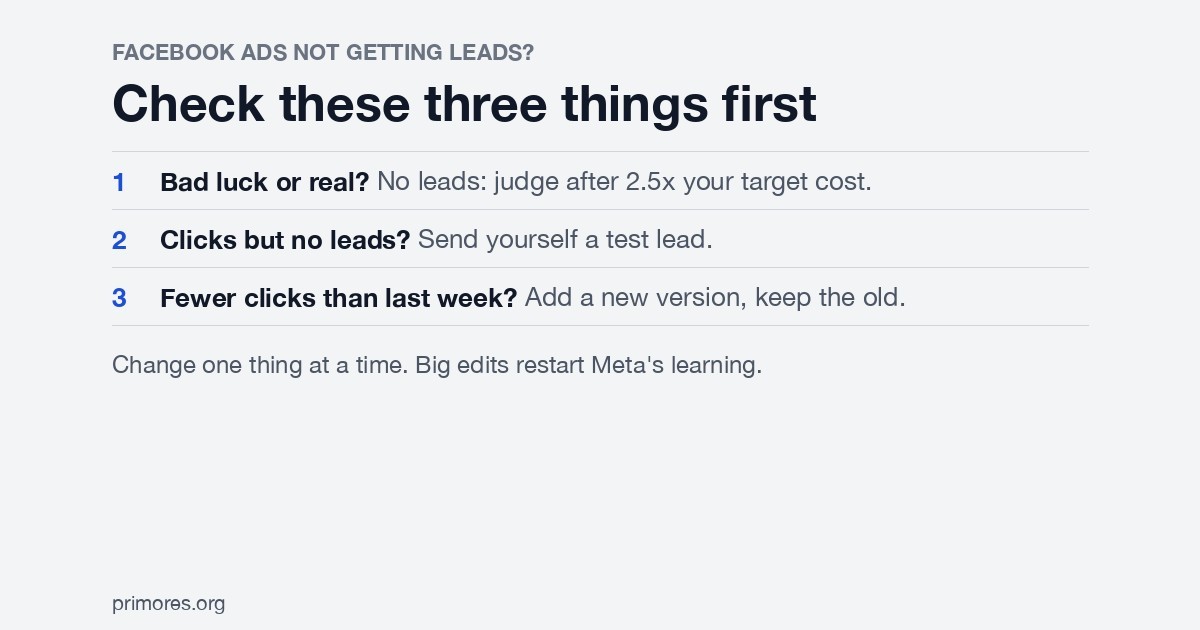
Facebook ads not getting leads? Check these 3 things first
By Andrej Ruckij · November 19, 2026 · updated November 24, 2026 · Meta pages checked November 19, 2026
TL;DR: When a Facebook or Instagram ad brings no leads for a few days, it’s usually one of three things, and each has a different fix. Bad luck: leads are rare, so an ad working exactly at your target cost still shows zero leads 37 times in 100 after spending one target’s worth. Don’t judge an ad with no leads before it has spent about 2.5 times what you’d pay for one lead. A broken form: if people keep clicking and nobody signs up, send yourself a test lead before you blame the ad; Meta has a free tool for it. A tired ad: if fewer people click than in the first days, make a new version of it, and Meta itself says to keep the old one running next to it. Changing things too early costs money too: every significant edit restarts Meta’s learning.
If you’d rather hand this over, we run Meta ads for clients and judge each ad by what it has spent against your target cost, not by how many days it’s been live: media buying.
Who this is for
Small businesses that get leads from Meta ads: a dentist, a heat pump installer, a salon, a real estate agent, a driving school. You run lead ads with a form, or ads that send people to a booking page, and you spend somewhere between €10 and €100 a day.
It’s less useful if you sell online and optimise for purchases (the same logic works, just read “sale” for “lead”), and not for you if someone already reads your ads account every day for you.
Why am I not getting leads on Facebook ads?
Most “7 reasons” lists give you targeting, budget, creative, offer, landing page and tracking all at once, and leave you to change everything. That’s the expensive way. Changing several things at once means you never learn which one was wrong, and Meta punishes the changes themselves.
Meta’s help page on the learning phase says it plainly: “By editing an ad, ad set or campaign during the learning phase, you reset learning and delay our delivery system’s ability to optimize.” An ad set usually leaves learning “after about 50 results in the week after the ad set’s last significant edit”, and during learning ad sets “usually have a higher CPA” (Meta Business Help Center). A small business getting ten leads a week never leaves learning at all, so every edit pushes it back to the start of something it was never going to finish anyway.
But leaving a broken ad running isn’t free either. Meta’s own October post on briefing the auction puts both sides in one paragraph: advertisers “leave a bad brief running because changing it feels risky. Then they tinker with a good one because tinkering feels like work” (Meta for Business).
So the job is to tell which situation you’re in. Three checks, in this order.
Check 1: Is it bad luck or a real problem?
Leads are rare events. If your ad brings one lead per €30, that doesn’t mean every €30 spent brings one. Some €30 bring two, some bring none. The question isn’t “did it spend more than my target?” but “if this ad were working fine, how likely is a result this bad?”
That’s a standard calculation (the Poisson model, used for counts of rare events). Here’s what it gives for an ad that’s really working at your target cost per lead:
| Spent, in multiples of your target cost per lead | Chance of zero leads anyway | Chance of one or fewer | Chance of two or fewer |
|---|---|---|---|
| 1× (e.g. €30 at a €30 target) | 37 in 100 | 74 in 100 | 92 in 100 |
| 2× | 14 in 100 | 41 in 100 | 68 in 100 |
| 3× | 5 in 100 | 20 in 100 | 42 in 100 |
| 4× | 2 in 100 | 9 in 100 | 24 in 100 |
| 5× | under 1 in 100 | 4 in 100 | 13 in 100 |
| 6× | under 1 in 100 | 2 in 100 | 6 in 100 |
Read it like this: an ad that spent €60 at a €30 target with no leads still has a 14 in 100 chance of being a perfectly good ad. Pausing it is a coin you’d lose fairly often. At €90 with nothing (5 in 100), it’s very probably not bad luck.
The rule we use: turn an ad off when the chance that it’s just bad luck drops to about 10 in 100. In practice:
- No leads: turn it off once it has spent about 2.5× your target cost per lead. At 2.5× a good ad still shows zero leads about 8 times in 100. One exception: if people keep clicking and nobody signs up, test the form first (Check 2), because a broken form looks exactly like a bad ad.
- One lead: turn it off at about 4× if that one lead is all it has.
- Two leads: turn it off at about 5.5×.
- Three or more: it’s past the bad-luck stage. Compare its cost per lead with your target like any other ad.
In money, at a €30 target cost per lead:
| Leads so far | Turn it off once it has spent |
|---|---|
| 0 | €75 |
| 1 | €120 |
| 2 | €165 |
Count everything the ad has spent since it started, not just this week. The lines move up with each lead because a good ad that already brought one or two needs more spend before a bad stretch stops looking like luck.
Before an ad reaches its line, the honest answer is “too early to tell”, and the useful thing to know is when it won’t be. At €20 a day on one ad and a €30 target, 2.5× is €75: about four days. Split the same €20 across four ads and each gets €5 a day, so it takes two weeks before you can judge any one of them. That’s the hidden cost of running many ads on a small budget, and it’s why Meta’s own learning-phase page says to “avoid high ad volumes”.
This model is simpler than reality: delivery isn’t steady, Meta can spend up to 75% over your daily budget on some days and less on others (Meta), and leads from one day can be reported the next. Real noise is bigger than the table, not smaller.
How big is the noise in practice? Jon Loomer ran three identical ad sets with about $1,300 between them. They got 100, 86 and 80 conversions, at $4.45, $5.18 and $5.56 each (Jon Loomer). Same ad, same audience, same budget, and a 25% gap between the best and the worst. His conclusion: “Do not underestimate the contribution of randomness to your results.” That’s one test, but it’s the cleanest one published.
How long should you run Facebook ads before turning them off?
Not a number of days: an amount of money relative to what a lead is worth to you. “Wait three days” means nothing if the ad spent €8 in those days, and too much if it spent €300. An ad-tool vendor that runs the same model puts it well: “There is no universal three-day or 3×-CPA rule that answers every case” (AdManage). The 2.5×/4×/5.5× rule above is where the odds say you can stop guessing.
What’s a normal cost per lead?
You need a target to use any of this. If you don’t have one, work it out from the business: what’s an average customer worth, and what share of leads become customers? A lead that turns into a €2,000 job one time in ten is worth up to €200 to you before profit.
For a sense of the market, the WordStream/LocaliQ 2026 benchmarks put the median cost per lead from Facebook lead campaigns at $27.39, with 8.54% of clicks turning into a lead. By industry: dentists $61.56, beauty and personal care $50.91, home improvement $42.95, health and fitness $27.11, real estate $13.74 (WordStream/LocaliQ 2026 benchmarks, PDF). These are US medians from roughly 450 lead campaigns the agency itself measured, so treat them as a range, not a promise.
Check 2: People click, nobody signs up. Is the form broken?
This is the one that costs the most money, because the ad looks busy. Clicks come in, the cost per click is fine, and the leads just stop.
A quick way to spot it: with 8.54% of clicks becoming leads (the benchmark above), an ad that got 30 clicks with no lead has about a 7 in 100 chance of that happening by luck; at 40 clicks it’s under 3 in 100. If your own ad used to turn clicks into leads and suddenly doesn’t, it’s usually not the ad. Something after the click broke.
What breaks, from real cases:
- The connection to your CRM or sheet. One Zapier user wrote “in meta so many leads coming, but in zapier none of leads coming”; Zapier’s support found the cause was “missing CRM access” (Zapier Community, 2026).
- Meta itself. In mid-2024 another user saw “Meta Ads has 306 leads, however the zap only run 178” during a Facebook-side delivery problem (Zapier Community). A CRM vendor dated it “between June 1st and July 25th, 2024” (SalesCandy).
- An edited form. When you edit or duplicate a lead form, it gets a new form ID, and an integration set up on the old form keeps watching the old one (Zapier guide).
- A website form or booking page that stopped working after an update, a plugin change or an expired calendar connection. If your ads count leads with the Pixel, also check it still fires: Conversions API vs Pixel covers how to check the events in Events Manager.
How to test your own form in five minutes
For a Meta lead form (instant form):
- Open Meta’s Lead Ads Testing Tool.
- Choose your Page, then the form your ad uses.
- Click Create Lead. It creates a lead with dummy data.
- Click Track Status. If your CRM or Zapier received it, the status says “success”; if not, “failed”, with an error code that tells you why (Meta developer docs).
- Check that the lead actually landed where your team looks every day, then delete it. Meta allows one test lead per form at a time.
Also open Meta Business Suite > Leads Center and compare the count there with what your team received. Meta says “All leads generated via a lead ad belong to the Facebook Page” (Meta developer docs): if they’re in Meta but not in your inbox, the ad is fine and the plumbing isn’t.
For a website form or booking page: fill it in yourself from your phone, on mobile data, the way a customer would. Check the confirmation, the email or message that should reach you, and the booking in your calendar.
Leads arrive, but nobody becomes a customer?
That’s a different problem, and it’s usually speed. The best-known study on this, from 2007 and run with a sales-software vendor, found the odds of reaching a web lead fell about 100 times when the call came after 30 minutes instead of 5 (Lead Response Management study, PDF). It’s old and it isn’t about Facebook specifically, but nothing published since says speed stopped mattering.
If the leads are poor rather than slow, try Meta’s Higher intent form type, which adds a review step before someone can submit. Meta’s own tool for optimising toward leads that actually become customers, Conversion leads, needs “at least 200 leads per month” (Meta developer docs), so most small businesses can’t use it yet.
Check 3: Is the audience tired of the ad?
Ads wear out. The same people see the same video four or five times and stop reacting. Meta has a name for it and shows it in Ads Manager. From its help page: “Creative fatigue occurs when an audience has seen the same creative too many times.” In the Delivery column you’ll see Creative limited when the cost per result is higher than your past ads “but less than twice as much”, and Creative fatigue when it’s “more than or equal to twice as much” (Meta Business Help Center).
The early sign shows before the cost rises: fewer of the people who see the ad click on it. Compare the click rate (link clicks divided by impressions) in the first three days of the week with the last three. A drop of about a third, on a few hundred impressions or more in each window, is worth acting on.
The fix is a new version of the ad: same offer, a new first three seconds, a new image. And here Meta says something most owners don’t expect: “Keeping your original ad active instead of pausing or turning it off may maximize results.” So add the new version next to the old one, don’t swap them.
Is turning off the expensive ad always right?
No. Meta spreads your budget toward the next cheapest lead, not the lowest average, and looking at averages per ad or per placement can make it look like money went to the worse one. Meta calls this the breakdown effect. Jon Loomer’s summary of it: it “leads advertisers to believe their budget is being misallocated” (Jon Loomer). Meta’s fluctuations page says the same in plainer words: look at results for the campaign or ad set as a whole, and “be careful when using specific result breakdowns” (Meta).
That doesn’t mean never turn anything off. An ad with no leads after 2.5× your target is a pattern, not a breakdown effect. It means: don’t turn off an ad only because its average cost per lead is higher than its neighbour’s.
The counter-argument: just leave it alone
Some good practitioners would say this article is still too hands-on. Loomer: owners “claim it’s a waste of money and they shut off their ads or lower their budget. That’s usually a mistake” (Jon Loomer). Meta’s own line is “Leave it alone. One brief, held still, measured.”
I agree for accounts that get 50 leads a week. Most small businesses get 5 to 20, and at that volume a broken form or an ad with no leads after €150 can quietly eat a third of the month’s budget. The three checks are built to keep you hands-off most days, and to make the rare change a deliberate one.
Two things this method can’t see. It doesn’t know whether a lead was any good: ten cheap leads that never answer the phone look great in the table. And it can’t account for seasons: a quiet week before a holiday isn’t a broken ad.
What I’d do this week
- Write down your target cost per lead (what one lead is worth paying for), if you don’t have one.
- Open Ads Manager, Ads tab, date range Maximum (everything since each ad started), and for each ad divide what it has spent by your target. No leads: turn it off above 2.5 (unless people are clicking, then test the form first). One lead: above 4. Two leads: above 5.5. Three or more: compare its cost per lead with your target.
- Send yourself a test lead through every form your ads use (Meta’s testing tool for lead forms, your phone for website forms), and check it arrived where your team looks.
- For your best ad, compare the click rate in the first and last three days of the week. If it dropped by a third, make a new version and run it next to the old one.
- Change one thing at a time, and write down what and when, so next week you know what worked.
Doing this by hand takes 15 minutes. Doing it every morning is where most people stop.
Doing it every morning with Claude
We built a free skill for Claude that does these three checks every morning and sends a short message: which ad to turn off, which to leave alone until a given date, and what to click. It reads your ads through Meta’s official connector, runs the odds from the table above in a small script, and never changes anything in your account; you do the clicking.
A morning message looks like this (made-up dental clinic, target €30 a lead):
Your Facebook & Instagram ads, Wednesday 18 Nov Yesterday: €68 spent → 1 lead. Worse than usual (you normally get about 2 a day for that).
- Fill in your own form for “Whitening offer video”: €90 over the last 3 days brought no leads while people kept clicking. Send yourself a test lead today.
- Turn off “Invisalign reel”: €75 spent since it started, no leads, and that’s not bad luck.
- Leave “Implant consult carousel” alone until 30 Nov: one lead for €45 looks bad, but it’s too early to judge.
It’s on GitHub with setup steps in plain words: Meta ads daily check. You need a paid Claude plan; in the EU and UK, Anthropic’s personal plans don’t allow business use, so it’s Claude Team there.
Is it smarter than asking Claude yourself? Not much, if you paste the right numbers and know what to ask. In our tests, plain Claude also caught the obvious problems. What the skill adds is that it gets the numbers itself, applies the same odds every day, and gives a date instead of a guess. If you want Claude to do more than read your account, Can Claude manage Meta ads? covers what it can change and the rules we’d set first, and how to connect Claude to Meta and Google Ads has the connector setup.
Sources
- Meta Business Help Center: About the learning phase, About creative fatigue recommendations, Understand fluctuations in ad performance, read November 19, 2026
- Meta for Business: You don’t beat the auction, you brief it
- Meta for Developers: Lead ads testing and troubleshooting, Lead ads guide, Conversion leads integration
- Jon Loomer: Results of identical ad sets, The breakdown effect, You’re probably not wasting money on ads
- AdManage: When to kill a Facebook ad (vendor)
- WordStream/LocaliQ Facebook Ads Benchmarks 2026 (agency data, US medians)
- Zapier Community: leads not syncing, missing leads in 2024, troubleshooting guide; SalesCandy notice
- Lead Response Management study (2007), PDF
- The odds table is our own calculation (Poisson model).