How to use the Meta Ad Library API, and is it free?
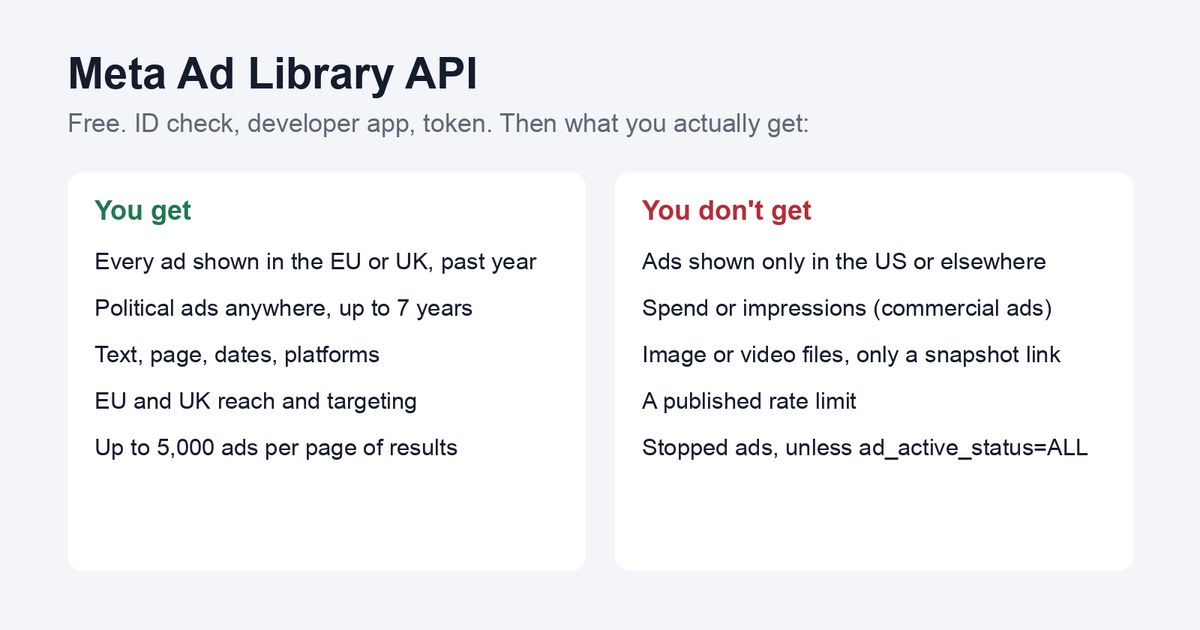
The Meta Ad Library API is free: confirm your ID, make a developer app, get a token. It only returns ads shown in the EU or UK, plus political ads.
How do you use the Meta Ad Library API?
By Andrej Ruckij · November 17, 2026
TL;DR: The Meta Ad Library API costs nothing. I couldn’t find a price anywhere in Meta’s docs. To use it, you confirm your identity at facebook.com/ID (it can take a few days), create a Meta for Developers app, generate a user access token, and call
graph.facebook.com/<version>/ads_archivewithad_reached_countriesset. The catch is coverage: it returns “Ads of any type that were delivered to the United Kingdom (UK) or European Union during the past year” plus political and social-issue ads from anywhere, and nothing else. A competitor that only advertises in the US is invisible to it. You get the ad text, page, dates and platforms, plus EU reach and EU and UK targeting, but no spend or impressions for commercial ads and no direct image or video files. Setad_active_status=ALL, or you’ll only see ads that are running right now.
We use this API inside our own ad-research tool for EU clients, before we brief video ads in every format, so the setup, the token handling and the research workflow below come from running it. The rest is from Meta’s docs and other people’s write-ups, and I say which.
Is the Meta Ad Library API free?
Yes. I couldn’t find a price, a usage tier or a paid plan anywhere in Meta’s documentation, and the third-party guides agree. Ads Uploader puts it as “No usage tiers, no credits.” What it costs you is setup time and the identity check.
The free part has a limit you’ll hit quickly: Meta doesn’t publish a rate limit for this endpoint. Its reference only lists error 613, “Calls to this api have exceeded the rate limit.” Ads Uploader says the limits “are dynamic and unpublished.” You’ll see a “200 calls per hour” figure repeated online; I couldn’t trace it to a Meta page, so don’t plan around it.
What does the Ad Library API return?
Meta’s own API page names two groups it covers, and everything else is left out. Every ad you get back has the Library ID, the creative’s text, the page name and ID, the delivery dates, and where it ran (Facebook, Instagram and so on). Then:
| Ad type | Returned? | Spend and impressions | Reach and targeting |
|---|---|---|---|
| Any ad shown in the EU or UK, last year | Yes | No | EU reach; EU and UK age, gender and location targeting; payer and beneficiary (EU only) |
| Political, election or social-issue ads, anywhere, up to 7 years back | Yes | Yes, as ranges | Age, gender and region breakdowns |
| Commercial ads shown only outside the EU and UK | No |
The coverage line in the API reference says it plainly: “Ads that did not reach any location in the EU will only return if they are about social issues, elections or politics.” Meta’s main API page now adds the UK to that, and its field reference describes targeting fields as “in the UK & EU”. So for commercial ads, think EU plus UK.
Two notes on the political part: Meta stopped running political and issue ads in the EU on October 6, 2025, and the 7-year window means the oldest ones are now being deleted on a rolling basis, so “7 years” is a ceiling, not a promise.
Two things people expect and don’t get:
- No performance data for commercial ads. Spend and impressions exist only for political and issue ads, and only as ranges like “1K-5K”. In our own tool we treat the number of days an ad has stayed live as the signal instead. An ad that’s run more than 30 days is a “longrunner”, which suggests it’s working, though a brand can leave a weak ad on too.
- No image or video files. You get
ad_snapshot_url, a link that renders the ad. Meta’s page says you “can download ad creative such as images and text for an individual ad”, but “it must be for analysis”, and “you cannot currently download a batch of archived ads”. The snapshot URL also contains your access token, so strip it before you paste links into a shared sheet.
How to get access to the Meta Ad Library API
Meta’s setup page lists three steps. It takes about 10 minutes of work, plus the wait for the ID check.
- Confirm your identity and location at facebook.com/ID. Meta calls it “the confirmation process required to run ads about social issues, elections or politics”. Meta says: “It can take a few days to confirm the information you submit.” Supermetrics, which connects to the API, says approval “typically takes 1–3 business days” and that “business accounts can’t be used to call the Ad Library API”, so use a personal account.
- Create a Meta for Developers account at developers.facebook.com and accept the Platform Policy.
- Create an app (My Apps > Create App). We used a basic “Other” app type and it worked.
Then the token:
- Open the Graph API Explorer, pick your app and generate a user access token. Most guides, and our own setup, add the
ads_readpermission here. Meta’s reference doesn’t say whether it’s required; the check that actually fails when something’s missing is the identity confirmation. - Swap it for a long-lived token. The default one is short. Meta’s docs say short-lived tokens expire “in an hour or two” and “A long-lived token generally lasts about 60 days.” Put a reminder in your calendar.
- Keep the token out of files. We set it as an environment variable in the shell that runs the script and never write it to disk.
To check it worked, run the first request below for a brand you know advertises in an EU country. If you get a data array back, you’re in.
How to make your first request
The endpoint is https://graph.facebook.com/<version>/ads_archive. Graph API v27.0 came out on November 4, 2026; older versions still work for a while. Check Meta’s versions page for the current one.
A request for every ad, active and stopped, from one page, shown in Lithuania:
curl -G \
  -d "search_page_ids=123456789" \
  -d "ad_reached_countries=['LT']" \
  -d "ad_active_status=ALL" \
  -d "fields=id,page_name,ad_creative_bodies,ad_delivery_start_time,ad_delivery_stop_time,publisher_platforms,eu_total_reach,ad_snapshot_url" \
  -d "access_token=$META_TOKEN" \
  "https://graph.facebook.com/v27.0/ads_archive"
The parameters that matter most:
ad_reached_countriesis required. Use country codes, orALL.ad_active_status“Defaults to ACTIVE”, per Meta. If you want to see what a competitor stopped running, and that’s often the most useful part, you needALL.search_page_idstakes “up to ten IDs, separated by commas” per call.search_termstreats “a blank space as a logical AND”, with a 100-character limit. Addsearch_type=KEYWORD_EXACT_PHRASEfor exact phrases. Search in the language the ads are written in; it doesn’t translate.media_typefilters by IMAGE, VIDEO, MEME or NONE.ad_delivery_date_min(YYYY-mm-dd) lets you pull only what’s new since your last run.
Results come back in pages. Meta’s FAQ says “each page of results can return a maximum of 5,000 ads”, and you follow the next link at the end of each response until there isn’t one.
Common Ad Library API errors
| Error | What it usually means | Fix |
|---|---|---|
| 190 (“Error validating access token: Session has expired” in our logs) | Token expired | Generate a new long-lived token |
| 613, “Calls to this api have exceeded the rate limit” | Too many calls | Pause, back off, run again later |
| 10, “Application does not have permission for this action” | Identity confirmation not finished, or missing permission | Finish facebook.com/ID, add ads_read |
| 1357045 | Per Ads Uploader, “almost always means the account behind the token has not completed identity confirmation” | Same as above |
| 100 | Bad parameter, often the ad_reached_countries format | Use ['LT'] style arrays |
Our own scripts are built around 190 and 613. They pause between calls and back off on 613. Every response gets cached, so a rerun picks up where it stopped, and an expired token stops the run with a plain message instead of a stack trace.
A workflow that works for competitor research
Steps 1 to 5 are what our research tool does for an EU market; step 6 is how I’d keep it current. It’s the part where the API beats clicking through the web library.
- Find the right page IDs. Searching a brand name also turns up resellers and fan pages. We list what comes back and have a person confirm which pages are really the competitor. Don’t let a script pick.
- Pull everything those pages ran in the target country, with
ad_active_status=ALL, paging to the end. - Group the variants into concepts. One idea usually runs as several ads with small text changes.
- Count days live per concept. Over 30 days is worth a close look; 60 or more, or a concept that came back after a pause, more so.
- Open the snapshot only for the concepts that matter, to see the creative.
- Rerun it regularly, for example weekly, with
ad_delivery_date_minset to your last run, and compare byidto see what’s new.
If you want to do this with an AI assistant instead of a script, I wrote up how to research competitors with Claude, and how to connect Claude to Meta and Google Ads covers the account side.
What if you need ads from outside the EU and UK?
The official API can’t help. For a US-only competitor you have two options: open the public Ad Library in your browser, which shows their active ads, or use a paid service that reads the public website. Prices as listed by the vendors in November 2026:
| Tool | Listed price | What you get |
|---|---|---|
| Apify Facebook Ads Scraper | from $3.40 per 1,000 ads ($5.80 on the free plan) | Ads with image and video URLs |
| SearchAPI, Meta Ad Library engine | $40/month for 10,000 searches; 100 free requests | Ads with image URLs, any country |
| ScrapeCreators | $47 for 25,000 credits; 100 free | Ad search, image URLs |
| Foreplay API | $99 for 100,000 credits, “One ad = One Credit” | Ad data; the Foreplay app is priced separately |
These come with a catch the official API doesn’t have. Meta’s Automated Data Collection Terms say: “You will not engage in Automated Data Collection without first obtaining Meta’s express written permission.” A 2024 court ruling in Meta v. Bright Data found that logged-out scraping of public data wasn’t covered by Meta’s terms in that case, but that was one case on its own facts, not a licence. We decided to stay with the official API only, and to read non-EU markets by hand.
Who this is for
Marketers and small agencies who research competitors in EU or UK markets and are tired of scrolling the Ad Library by hand. If your competitors only advertise in the US, the official API won’t show them, and this isn’t your tool. If you only need to look at a handful of ads once, the web library at facebook.com/ads/library is faster than setting all this up.
For the full field list and a Python example, see seo/meta-ad-library-api.
Sources
- Meta, Ad Library API (setup steps, coverage, fields, FAQ)
- Meta for Developers, ads_archive reference and ArchivedAd reference
- Meta for Developers, Introducing Graph API v27.0
- Meta for Developers, rate limiting, long-lived tokens, Marketing API authentication
- Meta, Automated Data Collection Terms
- Supermetrics, Meta Ad Library connection guide
- Ads Uploader, Facebook Ad Library API
- Meta Developer Community, permission error thread
- TechCrunch, court rules in favor of Bright Data
- Apify, SearchAPI pricing, ScrapeCreators, Foreplay API
- facebookresearch, Ad Library API Script Repository